--- title: "Implementing Loyalty & Referrals on a Custom or Generic eCommerce Platform" slug: "implementing-loyalty-referrals-on-a-custom-or-generic-ecommerce-platform" tags: ["Custom", "Loyalty and Referrals"] updated: 2025-10-10T13:07:41Z published: 2025-10-10T13:07:41Z canonical: "support.yotpo.com/implementing-loyalty-referrals-on-a-custom-or-generic-ecommerce-platform" --- > ## Documentation Index > Fetch the complete documentation index at: https://support.yotpo.com/llms.txt > Use this file to discover all available pages before exploring further. # Implementing Loyalty & Referrals on a Custom or Generic eCommerce Platform Products Loyalty ###### Supported plans Free, Pro, Premium, Enterprise ###### eCommerce Platform Custom ## Getting Started This guide provides a comprehensive overview of how to implement Yotpo Loyalty and Referrals on a generic non-hosted or custom-built eCommerce store. The integration consists of four main aspects: 1. **Backend setup** - Connecting your eCommerce platform with Yotpo and making sure there’s a constant flow of information between the two. 2. **Admin configuration** - Configuring account details within your Loyalty & Referrals admin. 3. **Coupons types: custom coupons vs. dynamic redemption** - Deciding which type of coupons works best for you and implementing the selected method 4. **Frontend elements** - Adding Yotpo Loyalty & Referrals elements to your store so that shoppers can interact with your rewards and referral programs. ## Backend Setup **Log in to your account or create a new one by** [clicking here](https://login.yotpo.com/#/login?product=loyalty). ### Order Data Use the [Create order API endpoint](https://loyaltyapi.yotpo.com/reference/create-order) to send your store’s order data to Yotpo. Below are some specific parameters to pay attention to: **customer_id** This is the customer identifier in your eCommerce platform. It will be used to connect the loyalty user with the platform user. This parameter allows Yotpo to authenticate the user profile and only lets confirmed users use their points for discounts in your store. Additionally, if a user changes their email address, the customer_id parameter will be used to update the customer details on Yotpo's end without losing all the relevant loyalty and referral data. **total_amount_cents** This parameter allows you to send the order amount so Yotpo's system will be able to grant rewards accordingly. **Please make sure to:** - Exclude discounts from the final amount sent to Yotpo - If you wish to exclude/include shipping & taxes when running the [Points for Purchase campaign](/v1/docs/setting-up-a-points-for-purchases-earning-rule), send the relevant order amount before/after shipping & taxes. Simply choose the sum you’d like to reward the shopper for. **Make sure this information is also reflected in the** [**refund data sent to Yotpo**](/v1/docs/implementing-loyalty-referrals-on-a-custom-or-generic-ecommerce-platform)**.** **status** This is the order status. Yotpo uses this parameter to determine whether points should be **added** or **deducted** from the shopper. Note: This is only relevant to merchants using [delayed point deduction](https://support.yotpo.com/docs/delayed-point-deduction) with dynamic redemption coupons. The different order statuses that trigger these changes must be configured in the Settings section of your L&R admin: ![](https://cdn.document360.io/f3c2ab59-fe4c-4f93-9614-2872f40e8aa7/Images/Documentation/slu34v0xpbeijw67zwskfwebhk2xnazpr0pzkdld6r3dtpeewverrygvx-rqpyklywergkezadblfkzvlz8le6xrvkcivozwnme4g7efb5lg6abmjjujgzkydslhkwbpkmonv2qe.png?sv=2026-02-06&spr=https&st=2026-11-08T12%3A46%3A01Z&se=2026-11-08T13%3A46%3A01Z&sr=c&sp=r&sig=jHqFVwmsJRso8haitYUGpcbkxV5eG%2BpEHeYEmxHrR0Q%3D) - **Order paid status -** The trigger for deducting delayed point deduction redemptions - **Process order with status -** The trigger for processing an order and giving rewards **If no status is configured** in the admin, our system will process both the discount and the order as soon as we receive the order information via an API call. **If two different statuses are configured -** If you configured a different status for each field, you will need to run the API call twice so Yotpo will be able to register the order status change and perform the relevant action. **We recommend rewarding points only once the order is shipped or completed to prevent customers from using points prematurely.** **created_at** The time when the order was created. If the parameter isn’t included, we will use the data intake time as the created_at parameter. This is mostly relevant when rewarding customers for completing a scheduled campaign within the relevant time frame. **coupon_code** Coupon codes used by the shopper when creating the order should be included in the order data. Only Yotpo Loyalty & Referrals related codes will be saved in the system. Associating the codes with orders is how our system recognizes redeeming customers across the loyalty and referrals dashboards. **ignore_ip_ua** If set to 'true', Yotpo will ignore the *ip_address* and *user_agent* fraud checks, allowing a referral to be completed even if no *ip_address* or *user_agent* are provided. If these parameters are provided while set to 'true', the fraud checks will be ignored. If you wish to use this feature, please reach out to your Yotpo representative or our [support team](https://loyalty.yotpo.com/contact-support) to enable it. **discount_amount_cents** The discount amount that was applied to the order. **tags** These are order tags. They can be used to limit spend-based campaigns - [Points for Purchases](https://support.yotpo.com/docs/points-for-purchases-earning-rule), [Punch Card](https://support.yotpo.com/docs/creating-a-punch-card-earning-rule) and [Goal Spend](https://support.yotpo.com/docs/goal-spend-earning-rule), to specific orders. **customer_object** - ***Tags*** - To limit campaigns to specific customer tags. - ***Has_account*** - This will complete the Create an Account campaign if the shopper has created an account with your store and the campaign is set up in the admin. The parameter will also opt-in a customer if the [opt-in strategy is set to Platform Account.](https://support.yotpo.com/docs/loyalty-opt-in) - ***Opted_in*** - Will opt-in a customer regardless of the strategy chosen in your Yotpo Loyalty & Referrals admin. ### Refund Data When orders are changed and refunds are made, you'll need to use the [Create Refund API endpoint](https://loyaltyapi.yotpo.com/reference/create-refund). This will trigger: - A deduction of points that were earned prior to the refund - Re-allocation of points used for a discount on the order or a returned product

One parameter to pay is the Items parameter - if you’re using the Required Product IDs/Exclude Specific Product Types settings in your campaigns, It’s important you send information about items that were refunded:

![](https://cdn.document360.io/f3c2ab59-fe4c-4f93-9614-2872f40e8aa7/Images/Documentation/8fb29cb1-2097-4143-b8d9-5de28eff7c6a.png?sv=2026-02-06&spr=https&st=2026-11-08T12%3A46%3A01Z&se=2026-11-08T13%3A46%3A01Z&sr=c&sp=r&sig=jHqFVwmsJRso8haitYUGpcbkxV5eG%2BpEHeYEmxHrR0Q%3D) For example, a [Points for Purchase campaign](/v1/docs/setting-up-a-points-for-purchases-earning-rule) that runs only for a specific product - our system needs to be aware that this product was refunded, resulting in the points awarded for purchasing it reverted. Note If shipping & taxes were included in the original order sum sent to Yotpo, make sure they are also reflected in the refund data. ### Customer Data Use the [Create/Update Customer Records API endpoint](https://loyaltyapi.yotpo.com/reference/createupdate-customer-records) to send your store’s order data to Yotpo. Below are some specific parameters to pay attention to: **id** This is the customer identifier in your eCommerce platform. It will be used to connect the loyalty user with the platform user.This parameter allows Yotpo to authenticate the user profile and only lets confirmed users use their points for discounts. Additionally, if a user changes their email address, the customer_id parameter will be used to update the customer details on Yotpo's end without losing all the relevant loyalty and referral data. **has_account** This parameter lets Yotpo know whether the customer has an account with the platform. **By default, it is set to False**. Marking the value as "True" will complete the [Create an Account campaign](/v1/docs/setting-up-a-create-account-earning-rule) if one is set up. It will also impact the customer’s opt-in status if [the opt-in strategy is set to “Platform Account”](/v1/docs/loyalty-opt-in#opt-in-global-settings). **opted_in/opted_in_at** This parameter determines the customer’s opt-in status. If it’s not included, we will rely on the [opt-in strategy](/v1/docs/loyalty-opt-in#opt-in-global-settings) set up in your loyalty account. **tags** Customer tags are relevant for targeting customers on specific campaigns. You can use the tags to include or exclude customers from desired campaigns: ![](https://cdn.document360.io/f3c2ab59-fe4c-4f93-9614-2872f40e8aa7/Images/Documentation/pnp94czifqdivpubtjsvfsmhuyc3z3rfignuibutsejan7sxuz_bvbx9mqgfv59ufdkjoqtrdnzesktasbecjxpufmfvugmayfwcnmalljwb26irxenooouqmrxlhpgs2ehzkeut.png?sv=2026-02-06&spr=https&st=2026-11-08T12%3A46%3A01Z&se=2026-11-08T13%3A46%3A01Z&sr=c&sp=r&sig=jHqFVwmsJRso8haitYUGpcbkxV5eG%2BpEHeYEmxHrR0Q%3D) ## Admin Configuration The step requires some modifications to be implemented within your Yotpo Loyalty & Referrals admin. ### Admin Settings - **Account registration URL** - Relevant for on-site elements so that if users wish to create an account, the button in the element will take them to the correct account creation URL. - **Sign up URL** - Relevant for on-site elements so that if users wish to sign up, the button in the element will take them to the correct signup URL. ![](https://cdn.document360.io/f3c2ab59-fe4c-4f93-9614-2872f40e8aa7/Images/Documentation/bac1328e-5fb5-4ab8-b65e-6065799f4a35.png?sv=2026-02-06&spr=https&st=2026-11-08T12%3A46%3A01Z&se=2026-11-08T13%3A46%3A01Z&sr=c&sp=r&sig=jHqFVwmsJRso8haitYUGpcbkxV5eG%2BpEHeYEmxHrR0Q%3D) Important Please make sure to set these up before setting up the modules. If the URL changes or was set after module creation, please [contact support](https://loyalty.yotpo.com/contact-support) to update the existing modules. **Do not duplicate modules as this setting will also be automatically duplicated.** - **Process order with status -** The order status that will trigger the processing of an order and the addition of points or rewards. - **Order paid status** - The order status that will trigger delayed point deduction redemptions. **Note** - **If no status is configured** in the admin, our system will process both the discount and the order as soon as we receive the order information via an API call. - **If two different statuses are configured** - If you configured a different status for each field, you will need to run the API call twice so Yotpo will be able to register the order status change and perform the relevant action. **We recommend rewarding points only once the order is shipped or completed to prevent customers from using points prematurely.** ## Coupons Types: Custom Coupons vs. Dynamic Redemption Since Yotpo is not fully integrated with your eCommerce platform, coupon codes generated in your platform must be actively shared with Yotpo. There are two ways in which you can send Yotpo coupon codes shared with the shopper: | **Custom Coupons** | **Dynamic Redemption** | | --- | --- | | [Delayed point deduction](/v1/docs/delayed-point-deduction) is not available | [Delayed point deduction](/v1/docs/delayed-point-deduction) available | | Does not require dev resources | Requires dev resources | | Must be manually maintained. You can automate the process with minimal dev resources. [Learn more](/v1/docs/creating-a-custom-coupon#uploading-codes-using-an-automated-flow-via-api) | An automatic process that must be set up by the merchant | | Requires you to create coupon codes in bulk | Requires the platform to be able to generate coupons on demand | | Multi-currency can only be supported by using “Percentage off” coupons and not “Fixed amount” coupons | Supports Multi-currency feature | **Settings up custom coupons** In your platform, you'll need to create bulk coupon codes for each type of reward you wish to offer. For example, if you want to offer $5 Off, $10 Off, and $25 Off coupons, you'll need to make sure to create bulk coupon codes for each one of these reward options. Follow the steps in [this article](/v1/docs/creating-a-custom-coupon) to create the different coupon options in your Yotpo Loyalty & Referrals admin, and possibly even set up an [automated flow](/v1/docs/creating-a-custom-coupon#uploading-codes-using-an-automated-flow-via-api) to continuously upload codes via API. **Setting up dynamic redemption** Dynamic redemption allows Yotpo to reach out to an API endpoint of your choice and request the creation of a coupon code on the fly. This way, coupon codes can be created on-demand instead of uploaded in bulk into the Loyalty admin. To set up dynamic redemption, follow the steps in [this article](https://support.yotpo.com/docs/implementing-redemptions-via-api). ## Frontend Elements ### Secure Customer Identification Yotpo’s on-site elements must have a way of recognizing who is completing actions on your storefront. It's necessary to identify the user currently logged-in and show them the discounts and point balances relevant to them. Customers can be identified by: - Their email address - The third-party ID sent to Yotpo via the [Create/Update Customer](https://loyaltyapi.yotpo.com/reference/createupdate-customer-records) or [Create Order](https://loyaltyapi.yotpo.com/reference/create-order) API endpoints For our on-site elements to be able to identify the customer and show them the details relevant to their account, you’ll need to implement a hidden *
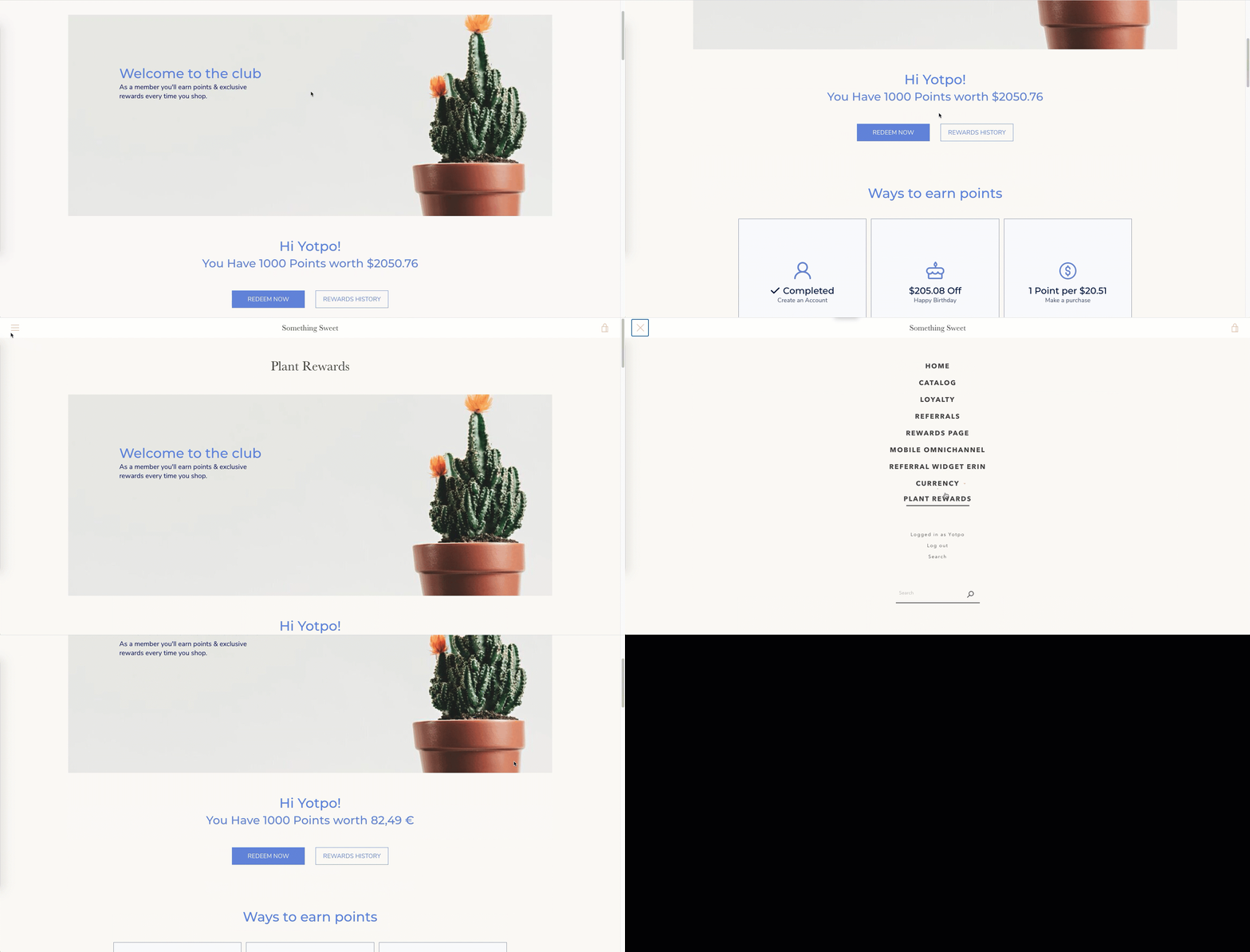
* tag with a signature token in your layout. This div must be present on the page before Yotpo’s JavaScript runs so that the on-site elements will show the information relevant to that shopper (i.e. their point balance, completed campaigns, etc). On page load, the Loyalty & Referrals modules will scan the DOM of the following element: ```plaintext ``` Example: ```plaintext ``` Note The data-tags attribute should be a JSON string representing an array of string tags. For example, if the customer was tagged “VIP” and “wholesale” you’ll need the tags to look like this: *data-tags=‘[“VIP”,“wholesale”]’* If the customer identification token is confirmed, the modules will populate with details relevant to that customer: point balance, VIP tier status, campaign completions, etc. Important This
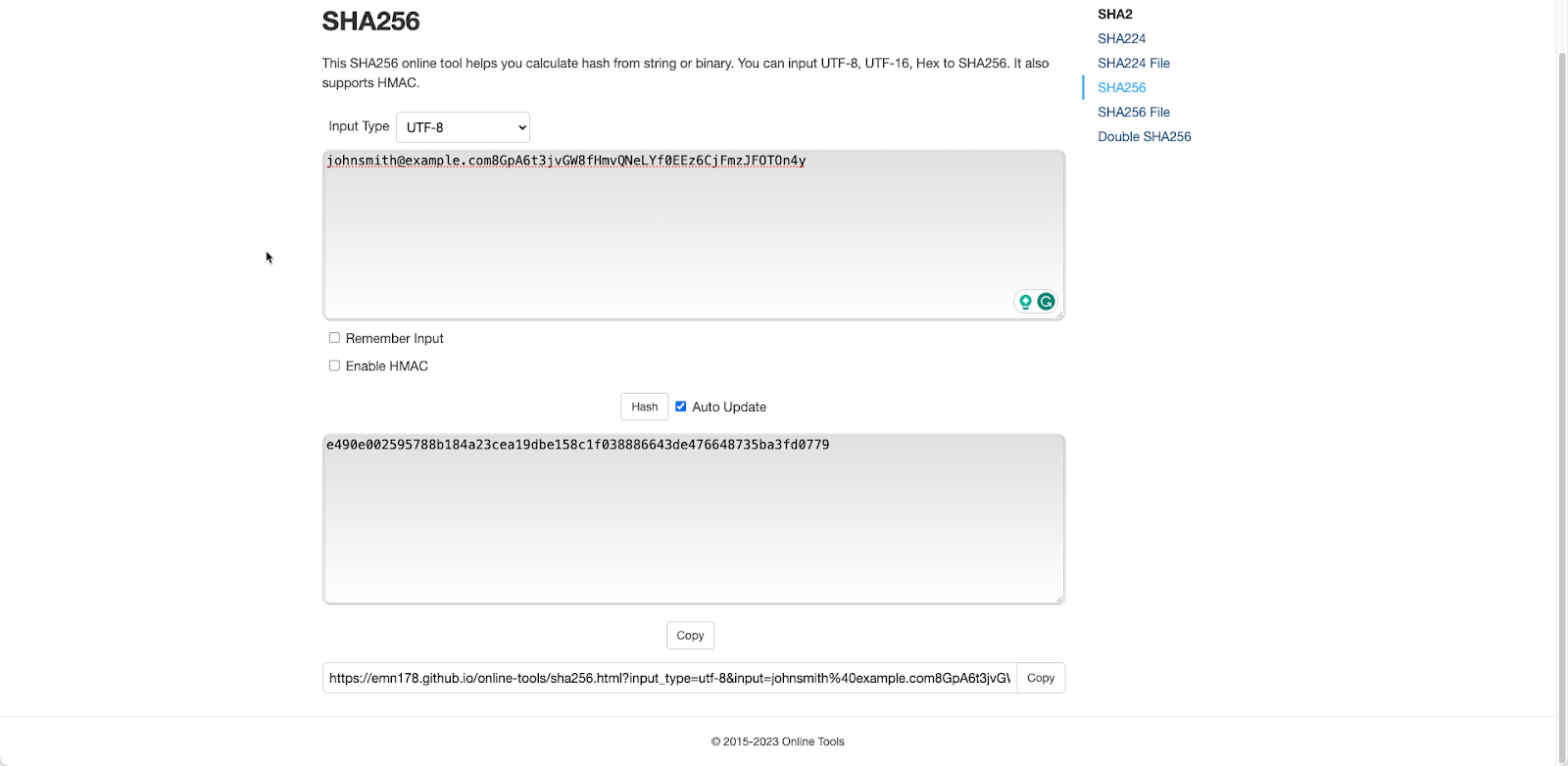
must be located on every page that has Yotpo Loyalty & Referrals on-site elements. ### Creating a Token To verify the integrity of the data shown to the customer and to ensure their identity, we enforce attaching a digested hash signature token. This token is injected by you onto the page and cannot be generated or copied by an attacker. Use the SHA256 hash type signature: 1. The signature is a hexadecimal digest using SHA256. 2. The message input of the SHA256 should be a sorted concatenation of the following values: 1. Customer email. 2. Your [Yotpo Loyalty & Referrals API Key](https://support.yotpo.com/docs/finding-your-loyalty-referrals-api-key-and-guid-2). **Make sure that your API key is not exposed at any point or leaked to any individual**. Tip You can generate an example signature using the [SHA256 Generator](https://emn178.github.io/online-tools/sha256.html). SHA256 Signature example: - Customer email: johnsmith@example.com - Your Yotpo loyalty and Referrals API Key: 8GpA6t3jvGW8fHmvQNeLYf0EEz6CjFmzJFOTOn4y ### ![SHA256 Signature example](https://cdn.document360.io/f3c2ab59-fe4c-4f93-9614-2872f40e8aa7/Images/Documentation/SHA256-Signature-example.png?sv=2026-02-06&spr=https&st=2026-11-08T12%3A46%3A01Z&se=2026-11-08T13%3A46%3A01Z&sr=c&sp=r&sig=jHqFVwmsJRso8haitYUGpcbkxV5eG%2BpEHeYEmxHrR0Q%3D) On-Site Modules Modules are easy-to-use widgets that can be configured and edited from within your Yotpo admin. Once you finish configuring a module, you’ll get a code snippet that you can add to the desired page within your store. Any additional changes you make to the module will immediately reflect on-site after the code has been added. Interactions with the modules are also recorded and displayed across [the various loyalty dashboards](/v1/docs/analytics-statistics) and provide insight into your user activity and program ROI. Click on the module to learn how to set it up: - [Rewards page builder](/v1/docs/getting-started-with-the-rewards-page-builder) - [Refer Friends module](/v1/docs/refer-friends-module) - [Product Share Referral module](/v1/docs/product-share-referral-module) - [Referral Welcome popup](/v1/docs/referral-welcome-popup) - [My Activity module](/v1/docs/my-activity-on-site-module) - [Earning Points module](/v1/docs/earning-points-on-site-widget) - [Redeem Points modules](/v1/docs/guide-to-the-redeem-points-modules) - [VIP Tiers module](/v1/docs/vip-tiers-on-site-module) #### Advanced Modules Note The following modules will require advanced dev resources For a smoother customer experience where the shopper doesn't need to copy-paste a coupon code to receive a discount or free product, implement the following modules: - [Checkout for generic integration](/v1/docs/implementing-the-checkout-module-on-a-custom-or-generic-platform) - [Free product for generic integration](/v1/docs/implementing-a-free-products-module-on-a-custom-or-generic-platform) ## Additional Features: Multi-Currency Our multi-currency feature allows shoppers to fully experience your shop and loyalty program in their local or preferred currency.![](https://cdn.document360.io/f3c2ab59-fe4c-4f93-9614-2872f40e8aa7/Images/Documentation/102f28e8-0147-4a35-82ce-c5c3e47147dd.gif?sv=2026-02-06&spr=https&st=2026-11-08T12%3A46%3A01Z&se=2026-11-08T13%3A46%3A01Z&sr=c&sp=r&sig=jHqFVwmsJRso8haitYUGpcbkxV5eG%2BpEHeYEmxHrR0Q%3D) To learn more on how to set it up, check out our [Multi-Currency Loyalty & Referrals Setup on a Custom or Generic eCommerce Platform](/v1/docs/multi-currency-loyalty-referrals-setup-on-a-custom-or-generic-ecommerce-platform) article.