Goals and Outcomes
Maximize the impact of your product reviews by syndicating them directly to Target.com. The integration between Yotpo and Target allows you to leverage your most influential content and reach customers wherever they shop.
In this article, you’ll learn how to syndicate your Yotpo reviews to Target.
How It Works
Here’s how the syndication flow works:
Customer Submits a Review
A customer writes a product review for one of your items.
Moderation by Yotpo
Yotpo’s moderation team reviews the submission to ensure it complies with Target's Moderation Guidelines.
Product Identification
Yotpo identifies the product using its assigned GTIN (e.g., UPC, ISBN, EAN, or Brand/MPN). Once moderated, the review is sent to Target.
Review Posting
Target publishes the review on the relevant product page, featuring a badge to indicate its source.
Ongoing Updates
Yotpo connects to Target through an API. When you enable Target syndication, Yotpo sends a full feed of your reviews to Target. After that, new and updated eligible reviews are sent to Target on an ongoing basis.
Syndication Policy and Review Publishing
Reviews will be syndicated to the retailer regardless of their publishing status on the merchant’s site. This means that even if you decide to reject a review on your own site, it may still be syndicated to Target and published there. This requirement is enforced by Target to meet authenticity standards and ensure that all reviews are included.
Customers on a Premium or Enterprise plan
Syndicate an unlimited number of reviews each month.
Upload existing reviews according to your contract.
This feature is an add-on and requires an additional fee. To learn more, reach out to your Yotpo account manager.
Syndicating Review Images
Images attached to your reviews now sync to Target alongside the review text, so shoppers see your customers' photos on your Target product pages. No setup is needed. Images sync automatically once they pass automated moderation.
Here's how image syndication works:
Each image is moderated on its own: If a review has three images and one is rejected, the other two still sync.
Review text isn't affected by image decisions: If every image in a review is rejected, the review text still syndicates as long as it meets Target's guidelines. If the review text is rejected, the whole review, including its images, isn't sent.
Store moderation doesn't apply: Image moderation for Target runs separately from your own store's moderation settings. An image you've rejected or unpublished on your site can still pass retail moderation and appear on Target.
You can't choose individual images: All images that pass moderation are sent automatically.
Older images are included: Images from reviews collected before August, 2026 are moderated and synced through the same process. Some older images may take a little longer to appear while this catch-up completes.
An image is rejected if it includes any of the following:
Inappropriate content: Nudity, children shown in undergarments (bathing suits and diapers are acceptable), dangerous or illegal activity, distasteful content such as wounds or lewd gestures, or profanity (including as an image caption).
Content that doesn't look authentic: Stock photos, watermarked images, heavily edited or professional-looking photos, or images too low in quality to identify the product.
Irrelevant content: Images unrelated to the product or the review, or images showing the product used in a clearly incorrect way.
Technical or legal issues: QR codes, barcodes, or personal information such as names, addresses, or phone numbers.
Content printed on the product or its packaging doesn't cause a rejection on its own. Product category is also taken into account, since what's appropriate varies by product type.
Note
Only images are syndicated. Review videos aren’t currently sent to Target.
Limitations
There are certain limitations when syndicating reviews to Target:
Product-Specific Reviews Only
Only product reviews will be syndicated. Reviews that aren’t related to the products sold on Target will not be syndicated. This includes reviews that mention shipping or service.Moderation Compliance
Reviews that fail to meet Target's Moderation Guidelines will not be syndicated.
Reviews associated with products whose GTIN does not match Target’s product catalog will not pass Yotpo’s moderation process and therefore will not be syndicated.
Verified Buyer or Incentivized Reviews
Imported reviews must be marked as Verified Buyer or Incentivized to be eligible for syndication. Reviews with other tags will be excluded. For more details, see Importing Reviews to Yotpo.Order ID Requirement
All verified buyer reviews, including imported reviews, must be associated with a valid order ID. Reviews that are not linked to a transaction - including reviews imported without a matching order - will not be eligible for syndication.
Grouped Product Reviews
For grouped products, only reviews specific to the original reviewed product will be syndicated. Reviews for other products in the group will be excluded. Learn more about Grouping Products.Internal Syndication Exclusion
Reviews internally syndicated across your Yotpo accounts cannot be syndicated to Target. See About Syndication for details.Incentivized Reviews
Incentivized reviews will be syndicated, except those marked as "Employee review." Learn more in Moderating Reviews.Valid GTIN Requirement
Reviews without at least one valid GTIN will not be syndicated.
How Target Product Families Affect Your Reviews
Target organizes products into product families, groups of related items (such as sizes and colors of the same product) that share a product page and its reviews. How you set up your product families in Target directly affects which of your reviews appear there.
Target allows each Yotpo product, including all of its variants, to be matched to only one Target product family:
One Yotpo product split across several Target families: Only one of those families receives the reviews. The other families don't receive any reviews from that Yotpo product.
Several Yotpo products in one Target family: This works as expected. Reviews from all Yotpo products appear on the same Target product family.
Example
In Yotpo, you have one product, the Classic Crew T-Shirt, with variants in blue and red. In Target, the blue variants are in one product family and the red variants are in another. Reviews of the Classic Crew T-Shirt appear on only one of those families, and the other family shows none of them. If both colors were in a single Target family, all Classic Crew T-Shirt reviews would appear there.
Important
To avoid losing review coverage, keep all variants of each Yotpo product within a single Target product family.
Product families are managed in Target, not in Yotpo. If you sell through Target Plus (Target's marketplace), work with your Target channel partner to set up how your variations are grouped. For Target's requirements on variations, see the Target Plus variations guidelines (requires a Target Plus Partner Portal login).
Learn more about retailer-defined product families and how they affect syndication across retailers.
Setting Up Target Syndication
Follow these steps to start using Target Syndication:
Step 1: Request Target Dashboard Activation
If you're on a Premium or Enterprise plan, please contact your Yotpo Customer Success Manager to enable the Target dashboard on your account.
Step 2: Verify Product Information
Ensure that every relevant product in your Yotpo product catalog has a product description and one of the following valid identifiers: UPC, ISBN, EAN, or Brand/MPN.
Platform-specific instructions for adding product identifiers (usually, we’ll put these details automatically to Yotpo):
Shopify: Update the product's Barcode field with a valid GTIN.
Generic: Add product specs via the API.
Once Target syndication is enabled on your account, the process will begin automatically. You can expect to see your reviews live on Target within 2–4 weeks.
Monitoring Your Reviews
Your Target dashboard will be updated twice a day.
To access the dashboard:
In your Yotpo Reviews main menu, go to Google & Syndication > Retail Syndication > Target.
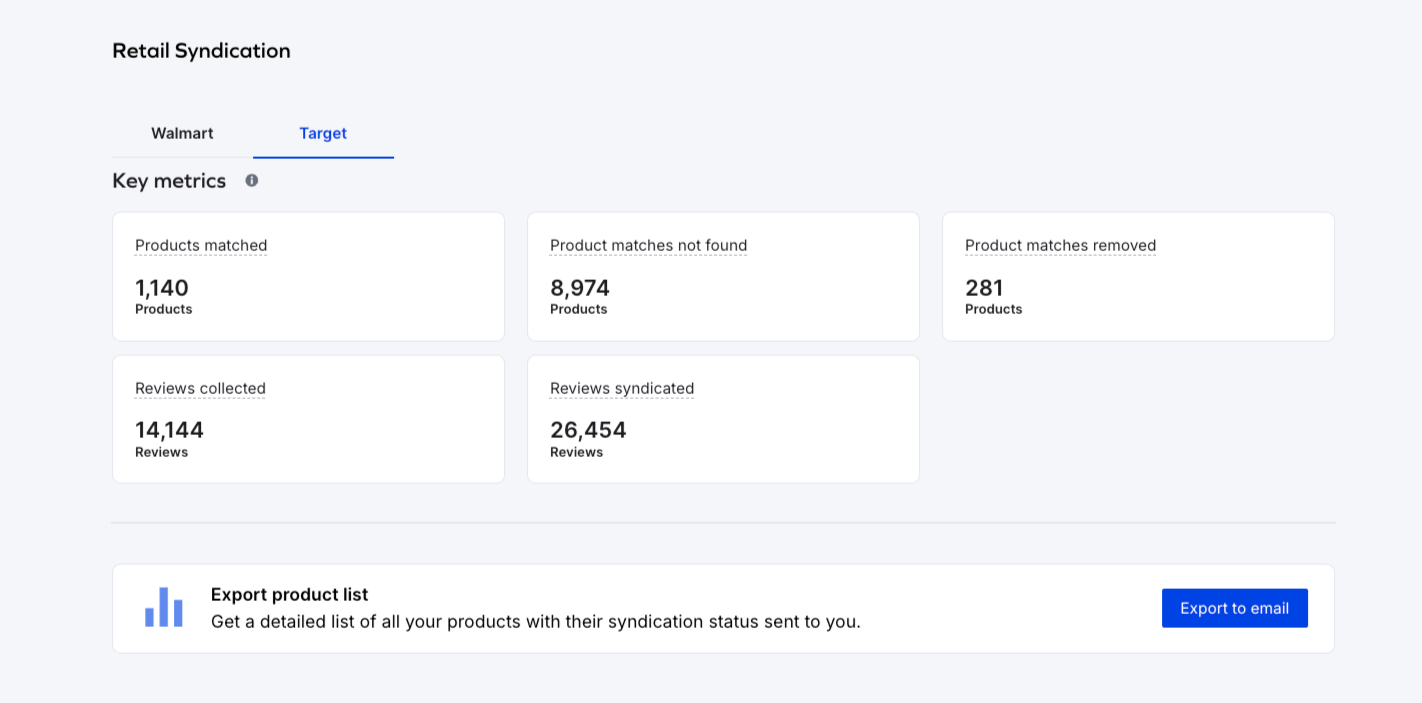
Syndication Overview
The following information is available:
Key Metrics
Product Matches: The number of products in your Yotpo catalog that match a product in your retailer's catalog using unique GTINs (e.g., UPC, EAN, ISBN).
Product matches not found: The number of products in your Yotpo catalog without a corresponding match in the retailer's catalog based on unique GTINs.
Product matches removed: The number of products that previously had a match between your Yotpo and retailer catalogs, but no longer match in the latest syndication update due to GTIN discrepancies.
Reviews collected: The total number of collected reviews for matched products.
Reviews syndicated: All reviews collected for matched products in Yotpo that have passed the retailer’s moderation guidelines and are ready to be published.
Dashboard Update
The Target dashboard updates twice a day, at 08:00 and 20:00 (UTC+2). Because reviews are sent to Target on an ongoing basis, a review may already be live on Target before it's reflected in the dashboard.
Checking the Syndication Status of Your Products
You can check the syndication status of your products by downloading the Syndication Report in CSV format. To do that, select Target as the retailer. You can filter the report by specific syndication statuses (e.g., Matched, Unmatched).
For each product, the report will show the following details:
Product Status
Collected Reviews
Syndicated Reviews
Product Identifier Type
Location URL
Last Updated
There are several syndication statuses you can see in the report:
Matched: The product has a match in the retailer’s catalog.
Match removed: The product previously had a match, but it was removed. This can happen if the product is removed either from the retailer’s or Yotpo’s catalog.
Match not found: The product doesn’t have a match in the retailer’s catalog and/or a valid identifier in Yotpo’s catalog.
For more details, check our Syndication Report Overview guide.
FAQ
How often are reviews sent to Target?
After the initial setup, new and updated eligible reviews are sent to Target on an ongoing basis.
Will a new review be syndicated automatically?
Yes. A new review is sent automatically as long as it meets Target's moderation guidelines (including the other requirements in Limitations), and its product is matched to Target's catalog.
Can I choose which reviews or images are sent?
No. All reviews and images that pass retail moderation are sent automatically, even if they aren't published on your site.
Why are some of my reviews missing on Target?
A review may not appear on Target if:
The product is missing a valid GTIN or isn't matched to Target's catalog.
The review didn't pass Target's moderation guidelines.
The review doesn't meet one of the other requirements in Limitations.
The product's variants are split across more than one Target product family. See How Target Product Families Affect Your Reviews.
Why don't my Target and store review counts match?
Target only shows reviews that meet its eligibility requirements, so its count is often lower than your store's. Product family setup is one of the most common causes of a gap. If a Yotpo product's variants are split across several Target families, only one family receives its reviews.
Why isn't a review image showing on Target?
The most common reasons are:
The image didn't pass automated moderation.
The image is a video. Videos aren't syndicated.
The image belongs to an older review that hasn't been processed yet.
See Syndicating Review Images for details.
Can I see which individual reviews were syndicated?
No. The Target dashboard shows aggregated data only, not individual reviews.
What should I do if a product is missing on Target?
Download the Syndication Report and search for the product by name or GTIN.
If the status is Match not found, check that the product has a valid UPC, ISBN, EAN, or Brand/MPN in Yotpo. You can use the product matching tool to manually connect the product to its corresponding item in Target’s catalog.
If the product is matched but its reviews are still missing, contact Yotpo Support.